Why Is My Voltas Air Cooler Display Not Working?
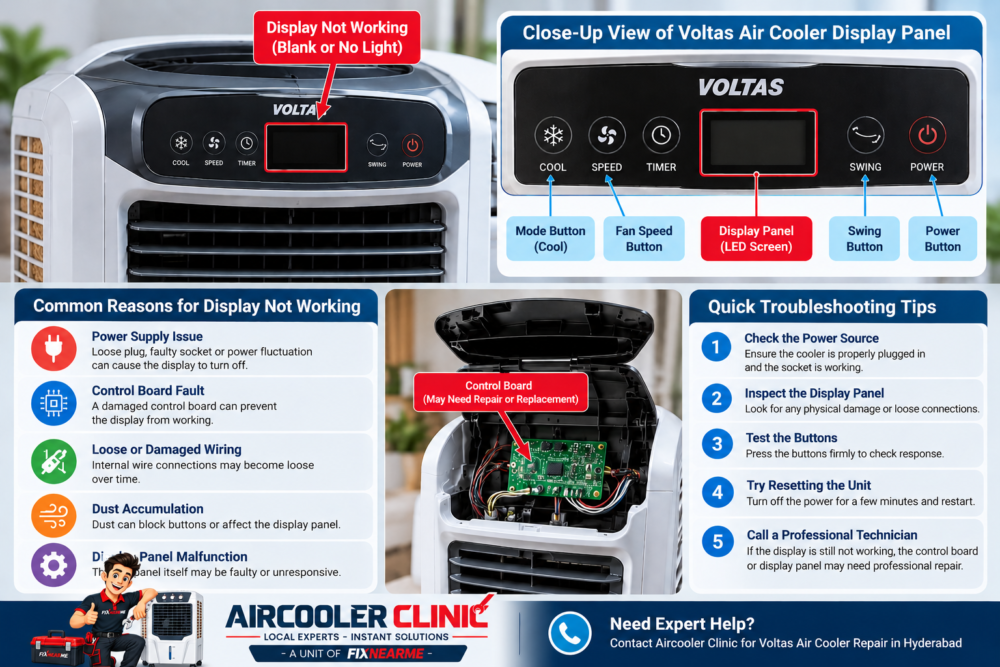
A Voltas air cooler display that is blank, flickering or unresponsive may indicate a power-supply problem, an issue with the controls, moisture exposure, physical damage or an internal electrical fault. The display itself is not necessarily the cause.
Start with safe external checks: confirm the power outlet and plug, look for visible damage, and check whether the cooler’s other controls respond. If the problem continues, consult the manual for your exact Voltas model or arrange professional inspection. Do not open the cooler or attempt internal electrical repairs yourself.
What Should You Check First?
If your Voltas air cooler display is not working, follow these steps in order:
- Check the power source. Confirm that the wall socket is functioning and that the cooler’s plug is properly connected.
- Inspect the external plug and cord. Look for visible damage, burn marks or exposed conductors. Do not use a damaged appliance.
- Check the cooler’s response. Observe whether the fan operates or any other controls respond normally.
- Look at the display. Note whether it is completely blank, flickering, partially visible or physically damaged.
- Consider recent events. Think about whether the problem started after cleaning, moving the cooler or possible moisture exposure.
- Consult the correct manual. Use the instructions for your specific model rather than assuming that every Voltas cooler has the same controls or reset procedure.
Disconnect the cooler from power before any external cleaning. If you notice a burning smell, electrical damage or suspected moisture inside the control area, stop using the appliance and arrange appropriate inspection.
Common Reasons a Voltas Air Cooler Display May Not Work
Several problems can produce similar symptoms. The following are possibilities, not confirmed diagnoses.
1. Power Supply or Connection Problem
If the display is blank and the cooler does not respond, the first question is whether the appliance is receiving power.
A disconnected plug, a problem with the wall socket or visible damage to the external power cord may explain the symptoms.
With the cooler disconnected, inspect the plug and cord visually. If the socket appears to be the problem, have it checked by a qualified electrician where necessary. Do not touch damaged wiring or attempt to repair electrical connections.
If the outlet and external connection appear normal but the cooler remains unresponsive, further diagnosis may be required.
2. The Display Is Blank but the Cooler Still Runs
If the fan operates while the display remains blank, the problem may be limited to the display or control interface. However, this observation alone cannot confirm which component has failed.
Note whether the cooler responds to its normal physical controls and whether the display changes at all during operation.
Do not continue operating the cooler if it behaves abnormally, has visible electrical damage or shows other signs of an unsafe condition. A technician can determine whether the problem involves the display, control system, power supply or another component.
3. The Display Flickers or Is Difficult to Read
A flickering or partially visible display may be associated with an electrical supply issue, a control-interface fault or another internal problem.
Observe when the flickering occurs and whether other functions are affected. Avoid repeatedly switching the appliance on and off in an attempt to force it to work.
If the display continues to flicker, becomes unreliable or is accompanied by unusual sounds or smells, stop using the cooler and arrange inspection.
4. Moisture or Physical Damage Around the Controls
Moisture, impact damage or a cracked control area may affect the display or controls.
Without opening the appliance, look for visible moisture, cracks, signs of impact or unusual discoloration around the external control panel.
If moisture may have entered the control area, disconnect the appliance from power if it is safe to do so. Do not reconnect it simply to see whether it works after drying. Have it inspected if internal moisture is suspected.
5. The Buttons Do Not Respond
If the display is visible but the buttons do not respond, the issue may involve the control interface or another part of the control system.
First, note which buttons respond and which do not. If the cooler has a remote control, compare its behavior with the physical controls, provided the appliance is otherwise safe to use.
For help with a remote that is not responding, see the Voltas air cooler remote troubleshooting guide.
If both the display and controls remain unresponsive after basic external checks, arrange professional diagnosis rather than opening the control panel.
Can You Reset a Voltas Air Cooler?
Reset procedures can vary by model. Do not assume that holding the power button for a particular number of seconds, or waiting for a fixed period, is a universal Voltas reset method.
For a safe approach:
- Switch off the cooler.
- Disconnect it from the power supply if it is safe to do so.
- Identify the exact model using its product label or purchase documentation.
- Consult the relevant instruction manual for any specified reset procedure.
- Follow only instructions intended for that model.
- If the display remains unresponsive, stop troubleshooting and seek appropriate technical assistance.
Do not attempt a reset if there is visible electrical damage, a burning smell or suspected moisture inside the controls. A reset cannot be assumed to resolve an underlying hardware fault.
For model-specific assistance, use the current official Voltas website and support resources.
How to Clean the External Control Panel Safely
Dust around the external controls can make the panel difficult to use, but cleaning will not necessarily resolve an internal electrical fault.
If the cooler is disconnected from power and there is no indication that moisture has entered the appliance:
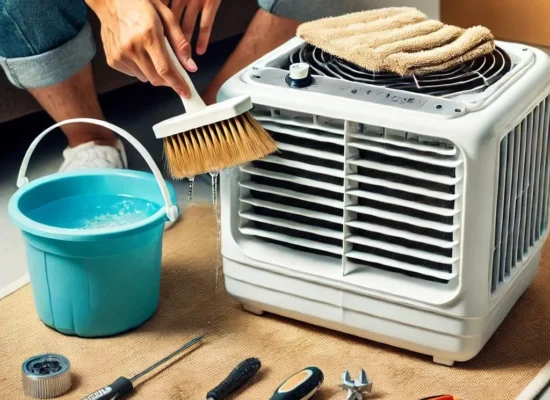
- Use a soft, dry cloth to wipe the external control area.
- Avoid pressing excessively on the display or buttons.
- Do not pour water onto the controls or spray cleaning liquid directly onto them.
- Do not insert tools into gaps or remove the control-panel cover.
- Follow the manufacturer’s cleaning instructions for your model.
If the display remains faulty after external cleaning, do not repeat the cleaning process with more moisture. Arrange inspection instead.
When Should You Contact a Technician?
Professional inspection is appropriate when:
- The display remains completely blank after basic checks.
- The screen flickers repeatedly or becomes unreliable.
- The physical controls do not respond.
- The cooler stopped working after a suspected electrical event.
- Moisture may have entered the control panel.
- The appliance has visible electrical damage or a burning smell.
- The display problem returns after temporary recovery.
- Internal electrical or electronic components may require inspection.
Do not remove the control board, repair internal wiring, bypass electrical connections or test exposed circuits yourself. These tasks require appropriate expertise and precautions.
A technician can assess the symptoms and determine whether the issue involves the power supply, display, control interface or another component. The cause should be confirmed through appropriate diagnosis rather than assumed from the display symptom alone.
Should You Contact Voltas or an Independent Repair Provider?
The appropriate option depends on your warranty status and the type of assistance you need.
Consider official Voltas support if:
- The cooler may still be covered by its applicable warranty.
- You need model-specific operating or reset instructions.
- You want to confirm warranty eligibility and service terms.
- You prefer to begin with the manufacturer’s support process.
Check the current warranty documentation and service conditions before arranging an independent repair.
Consider an independent repair provider if:
- You need local inspection or repair assistance.
- The cooler is outside the applicable warranty, or you have confirmed the permitted service route.
- The issue requires further diagnosis and a suitable service is available in your area.
Aircooler Clinic is a unit of FIXNEARME that provides doorstep air cooler services in Hyderabad and applicable service areas. It does not operate a separate physical Aircooler Clinic service center, and its service availability should be confirmed before booking. It is an independent service provider, not a Voltas manufacturer-operated service center.
For current service availability, contact Aircooler Clinic using the details below.
Frequently Asked Questions
Why is my Voltas air cooler display completely blank?
Possible explanations include a power-supply problem, an external connection issue, a control-interface fault, moisture exposure or an internal electronic problem. The exact cause cannot be confirmed from a blank display alone.
Why does my Voltas cooler run when the display is not working?
If the fan operates while the display is blank, the fault may be limited to the display or control interface. Other internal problems are also possible, so professional diagnosis may be needed.
Can I repair a Voltas cooler display at home?
You can perform basic external checks, such as inspecting the plug and cord for visible damage and consulting the correct model manual. Internal electrical or electronic repairs should be handled by an appropriately qualified technician.
How do I reset my Voltas air cooler?
Check the instruction manual for your exact model. Do not rely on a generic button-holding procedure unless the manufacturer specifies it for that model.
What if the display works but the buttons do not?
The issue may involve the control interface or another component. Note which buttons respond and whether other normal controls work. If the problem persists, arrange inspection rather than opening the panel.
Can moisture cause an air cooler display problem?
Moisture entering the control area is one possible cause of a display or control fault. If internal moisture is suspected, disconnect the cooler from power if safe and do not reconnect it until the appliance has been appropriately assessed.
Where can I get Voltas air cooler repair in Hyderabad?
You can begin with official Voltas support if you need manufacturer assistance. For independent doorstep repair, Aircooler Clinic offers air cooler services in Hyderabad and applicable service areas, subject to availability. Confirm the service requirements before booking.
Conclusion
A Voltas air cooler display that is blank, flickering or unresponsive does not necessarily mean that the display panel itself has failed. Check the external power connection, look for visible damage, observe whether other controls work and consult the manual for your exact model.
Avoid opening the appliance, attempting internal electrical repairs or using an unverified reset procedure. If the display remains faulty, arrange appropriate technical inspection.
For warranty questions or manufacturer-specific instructions, consult official Voltas support. For independent doorstep repair assistance, contact Aircooler Clinic to confirm current service availability.
Aircooler Clinic contact details
- Phone: 7997100067
- Email: aircoolerclinic@gmail.com
Aircooler Clinic is a unit of FIXNEARME providing doorstep air cooler services in Hyderabad and applicable service areas. It does not operate a separate physical service center.